Reporting: Lightspeed (L-Series) transactions in the Voucher Connect office
Get detailed, drill down reporting for Voucher Connect transactions that have been processed via Lightspeed (L-series) integration.
In Lightspeed (L-Series):
Login to your Lightspeed back office account on desktop.
Navigate to Reports > Receipts
From here you can filter by dates, payment types, values and more.
When you find the desired receipt you can print or download a copy by clicking View > Print on the right hand side of screen
Make a note of the Receipt ID for the receipt that you would like to examine further in the Voucher Connect reporting suite.

Voucher Connect reporting on desktop:
Login to your Voucher Connect dashboard.
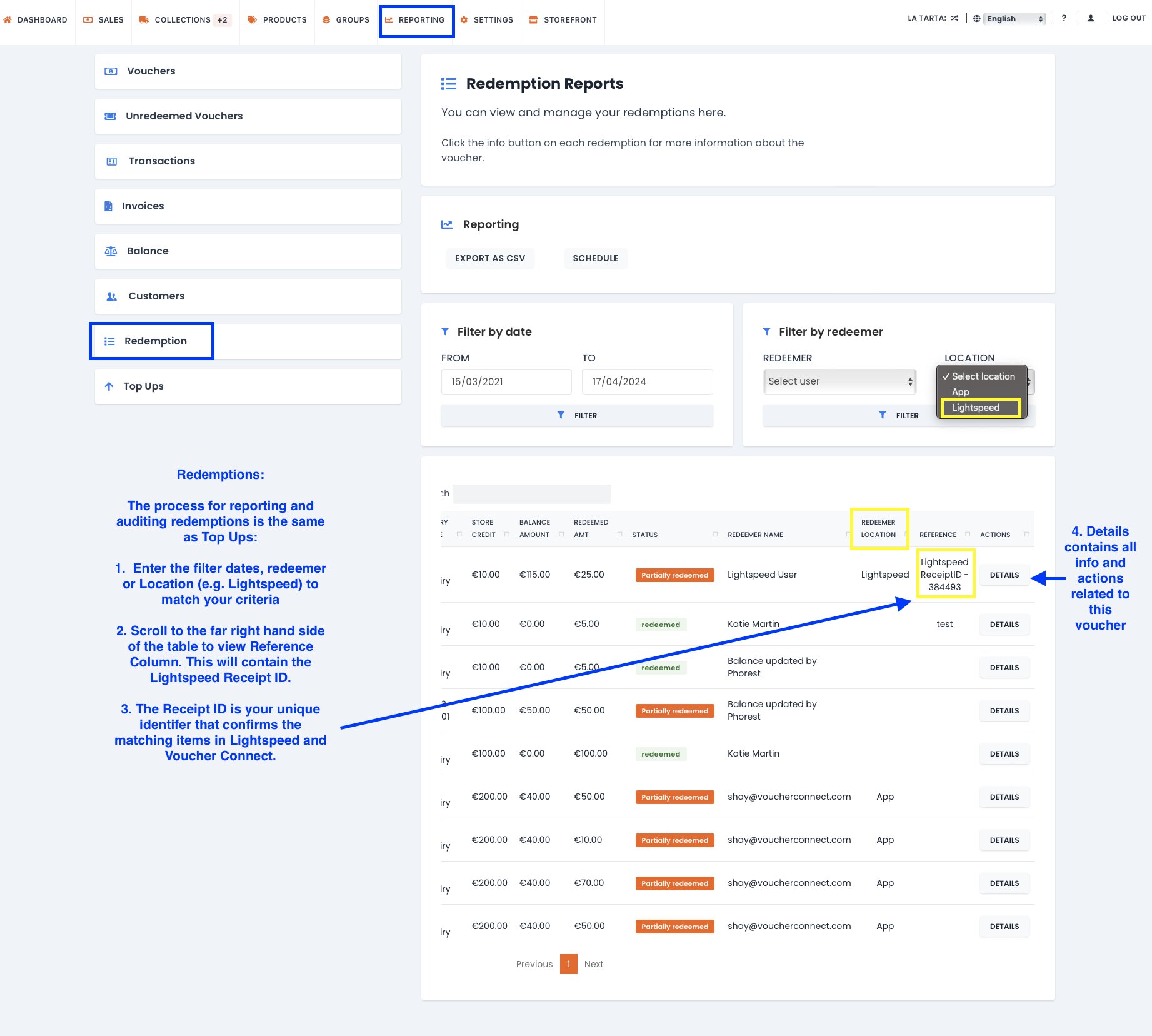
From dashboard select REPORTING on the top menu bar:
From left hand side menu bar in Reporting:
> For Voucher Connect payments made in Lightspeed select Redemptions.
> For Voucher Connect voucher sales made in Lightspeed select Top Ups.
Use the filters (date, location, user etc) to fit your criteria.
Reference column will contain the Lightspeed Receipt ID.
Click DETAILS to view ALL associated voucher transactions and actions.